
Updating Company SA Participant Roles or Removing Participants
Company participants on a Supervisory Activity can be updated or removed at any time until the Examination or Investigation is Closed.
Before you begin
About this task
Note: Only the company lead can manage participants on a
Supervisory Activity
Procedure
-
Navigate to your supervisory activity.

-
Click Participants.

-
Click the View Details icon next to the desired
participant's name.
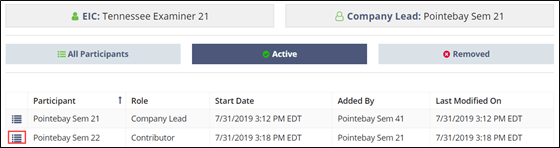
-
Click Update Participant Role or Remove
Participant.
